Interactive experiences · Practical guide
From idea to prototype: an interactive experience brief
Start with the audience response you want. Choosing a sensor or character first can leave participation, content, and operation unresolved. This guide organizes those decisions through a proposed example.
The brief: audience, action, and response
- Invitation
- Available action
- Perceptible response
- Exit / next session
Describe the participant’s action and the response they will see: “As a person approaches the zone, a shape follows them and they can choose a color.” This is a proposed scenario. It needs neither identification nor image recording. The sentence distinguishes a presence response from a precise gesture or a conversation.
- Audience: expected ages, languages, individual or group participation, and an option for anyone unable to perform the movement.
- Journey: where people are invited in, where they see the response, and how they leave the zone. Separate active participants from spectators.
- Response: visual and audio change, start, duration, and exit. Define what appears when nobody is participating.
- Operation: who assists, who handles a missed detection, and who can stop interaction while keeping the screen on.
For an initial inquiry, provide the date, approximate location, goal, and a reference for the desired action. The next step surveys dimensions, light, circulation, surfaces, and services. Plan how many people can take part in each zone and session. Screen size alone does not determine that number.
Agree on what successful participation means: a clear action, a response visible from the intended position, and an obvious exit for the next person. Test the assisted alternative too. This brief does not replace a venue assessment or establish occupancy limits.
A prototype that helps define scope
The first demo should answer a concrete question: whether the action is understandable, the response is readable, or two people can use the same space. Show a sequence of states using simulated inputs before investing in a complete chain. A reference video helps discuss appearance; it does not validate tracking, audio, or delay.
- Script and journey: entry, action, response, exit, repeat, and assistance; identify who can participate simultaneously.
- Signal map: content, data, voice, render, output, and owner of each stage. Mark components not yet selected.
- Resources: file and project versions, cleared character/voice rights, languages, captions, surfaces, software, licenses, and operators to confirm.
- Acceptance test: describe the action and expected result, method, conditions, agreed tolerance, and person responsible for testing. Record the observed result after running the test.
Proposed example: a valid simulated input changes the display from idle to the selected color; when the data expire, the display returns to idle; during selection, the operator can enable assisted mode. The record must distinguish expected from observed results and separate content, input, and output faults.
For pricing, separate content creation and adaptation, integration, testing, installation, operation, and contingency. List what your production team provides and what you need quoted. The prototype helps identify decisions that affect cost and schedule. Approve the content, check the logic with simulated inputs, and test the system in the actual space as separate steps.
Frequently asked questions
Do I need plans to start?
You can inquire with an idea, date, and approximate venue. Dimensions, services, and site conditions are confirmed as the solution and quote develop.
Does a demo mean the installation is tested?
A demo may validate a script or response using fictional inputs. Real detection, lighting, audio, network, and surface need their own tests.
Connect the idea with AV production
GLMedia can assess LED, video, processing, playback, and operating interfaces within agreed scope. Application development, character, voice, or specialist tracking require defined owners, resources, and availability.
The Miramar studio combines LED walls and flooring with multicamera production. It provides a reference for integrating display surfaces with camera images. Adding an avatar or sensors requires a separate interaction design and test.
- Producer/creative: purpose, script, rights, content approval.
- AV: formats, compositing, destinations, voice, operation, fallback.
- Interaction: data, logic, integration, licenses, response testing.
- Venue and installation team: surfaces, access, physical conditions, and responsibility for approving the space for use.
Depending on the project, the inquiry may cover equipment rental or purchase, integration, and technical support. The proposal should identify the supplied items, who handles specialist development, and which equipment and licenses are confirmed for the date.
What to send to start an inquiry
Start with a short description, without choosing a brand or preparing plans. If you have a visual reference, explain which part matters: appearance, audience action, or presentation. This allows equivalent alternatives.
- Goal/action: what the person should do and see/hear afterward.
- Date, duration, approximate venue/city, and connected spaces.
- Audience: individual/group participation, languages, known assistance needs.
- Surface/content: approximate size if available, existing video/character, approval owner.
- Resources/scope: production-provided items and what GLMedia should assess; mark missing information.
Fictional example to adapt: “We want a character welcoming visitors and explaining three choices in Spanish and English. We prefer approved messages with host assistance. It is indoors; date, dimensions, and equipment remain undefined. We need content, surface, operation, and fallback options.”
With this information, we can plan the site survey, compare options, and prepare a test. Availability, development, licensing, and pricing are confirmed with concrete scope; you need not solve everything before inquiring.
Before defining the proposal
Can I share a reference from another installation?
Yes. Explain which part matters: appearance, audience action, or presentation. A reference communicates intent; the system is assessed for your space and scope.
What should I define before requesting pricing?
The goal, action, date, and approximate venue are enough to start. A final proposal needs surface, content, interfaces, operation, and testing details. Mark unknown information in the worksheet.
Worksheet for discussing the idea and preparing the brief
Fill in what you know and leave survey-dependent decisions open. Use the worksheet to discuss the proposal and plan tests.
From concept to an on-site rehearsal
The color-choice example separates four decisions. This diagram describes a possible preparation process; it does not show a completed installation or test.
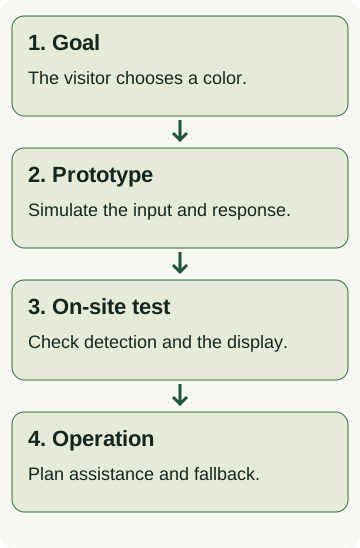
- In the prototype: record which input is simulated and which result you expect.
- On site: check detection, lighting, audio, the network if used, and alignment between the action and picture.
- Before admitting visitors: agree who starts, pauses, or resets the session and how the activity continues if detection fails.
Use this guide’s worksheet to record the goal, space, and open decisions. Equipment, development, licenses, and availability are confirmed for the specific scope.
Sources and scope
- W3C WAI — Making Events Accessible — Guidance on planning accessible participation options and media.