Screen size
Width and height determine the cabinet count, support footprint and handling. Send approximate dimensions or a photo of the space.
 Get a quote
LED VIDEO WALL RENTAL
Rent an indoor or outdoor LED wall for a conference, trade show, concert or brand event. Hire the equipment for your crew, or ask GLMedia to deliver, install and operate the system.
Our equipment base is in Miramar. We work in Miami, Miami Beach, Fort Lauderdale and across South Florida, with travel to other Florida venues quoted for the project.
LED wall rental cost · quick answer
There is no single rate that covers every LED wall rental. Your price depends on the screen dimensions and panel system, the dates, and whether you need equipment only, installation or show operation. Venue access, transport and the video feeds can change the total even when the screen size stays the same. Start with the date, venue and what you want people to see; you do not need to choose a pixel pitch or processor before asking us for a quote.
Width and height determine the cabinet count, support footprint and handling. Send approximate dimensions or a photo of the space.
Fine text, close viewing and camera shots influence the panel choice. The smallest pitch is not automatically the right rental for your event.
Daylight and exposure affect the panel and installation requirements. A covered outdoor position still needs review for weather and wind.
Ground support needs floor space behind the image. A flown wall needs approved suspension points and a rigging plan for the selected system.
Include load-in, rehearsals, show days and strike. A one-day event can require equipment and crew on more than one date.
Tell us what your team will handle. Building the wall, setting up playback and operating camera feeds are different tasks to assign.
The truck route is only part of delivery. Dock appointments, freight elevators and a long move to the ballroom affect the work.
A presentation laptop, live cameras and several independent screens need different signal paths, processing and operator arrangements.
These are ways to scope a job, not fixed packages. The written proposal identifies equipment, accessories, crew tasks and the handover between teams.
For an AV crew that can build and run the system. Agree on the cabinets, processing, accessories, pickup or delivery, and who checks the equipment at handover.
Ask for transport, setup, testing and strike. If your crew operates the show, agree on the signal handover and who stays on site after installation.
Include a technician or operator for the agreed hours and tasks. Confirm who cues videos, switches presentations and handles any live camera feeds.
Combine LED with playback, cameras and other AV systems when needed. We can reinforce another production company and work under its name; technical coordination is separate from organizing the whole event.
Cross-rental for production companies
Tell us which system is on site and whether you need installation, LED configuration, playback or show operation. We check compatibility and crew availability before confirming the work.
See video processing and operator optionsCompare the full job, not just the panel line. Check that each item below is included, optional or assigned to your crew or the venue. An equipment-only quote and an installed system are different purchases.
LED cabinets, processor/controller, signal cabling, playback and any switching or camera feeds.
Transport, delivery/pickup, support or rigging, setup, testing, strike and technician hours.
Power distribution, content preparation, video engineering, venue labor and services, permits and taxes where applicable.
In a ballroom or studio, review ambient and stage lighting, viewing distance and how much detail the content contains. A close audience reading small text may need a different screen than a large room showing a speaker on camera.
An outdoor wall is more than an indoor screen turned up brighter. Daylight, water exposure, wind, ground conditions and protected connections affect the equipment and installation plan. The panel rating alone does not establish that the complete installation is suitable.
Two rooms with the same size screen can require different installation schedules. These details help us allow for the actual work before the crew arrives.
Booking, truck access and unloading time.
Door size, capacity and availability.
Distance, ramps, stairs and floor protection.
When access starts and the room must be ready.
Approved points and the venue’s rigging provider.
Available circuits, connectors and supply location.
Required house crew and any exclusive services.
When strike can start and cases must be out.
Readable slides from the back of the room, space for the speaker and time to test the actual presentation.
Booth dimensions, organizer rules, installation slots and a content layout that works for people walking past.
Screen positions, stage lighting, live camera images, playback cues and coordination with the show crew.
Sun direction, ground conditions, structural requirements and an agreed weather plan for the installation.
Test the actual camera positions, frame rates, shutter settings and LED processing together. A refresh-rate figure alone does not guarantee a clean image.
Match the equipment request to the existing system and agree on crew responsibilities, handover and client-facing communication.
Start with the date, city or venue, type of event and what you want to show. A rough idea is enough to begin.
If you have them, add the room or stage plan, approximate screen width and height, audience size, closest and farthest seats, indoor/outdoor position, camera use and content examples. Include rehearsal and show hours, load-in/load-out windows, and whether you need delivery, installation, an operator or playback support.
You can ask for help without knowing the pixel pitch, controller, receiving card or file resolution. Tell us what will happen during the event and which decisions are still open. We can work through screen options with you before preparing the quote.
For an installed and operated rental, we coordinate these stages with your production team. For equipment only, the process centers on preparation, pickup or delivery, handover and return; GLMedia installation and show operation are not automatically included.
These three indoor P2.6 configurations are already listed in our hotel packages. Dimensions are a starting point: we still need to check the room, viewing distance and content. Feet are rounded; the metric dimensions follow the cabinet grid.
3.5 × 2 m · 28 cabinets · 1,344 × 768 pixels
4.5 × 2.5 m · 45 cabinets · 1,728 × 960 pixels
5 × 3 m · 60 cabinets · 1,920 × 1,152 pixels
Need a different size or equipment only? Tell us what your crew will handle. The hotel package conditions do not automatically apply to other rentals.
See installed package prices and conditions
The LED calculator compares cabinet layouts, pixel maps and initial estimates. It does not check venue approval or confirm a final price. For a hotel ballroom, the installed-package page lists its own scope and conditions. Use either as a starting point, then confirm the actual job in writing.
Alongside rentals, we sell LED screens for businesses, permanent installations and AV companies. We can supply equipment or also quote installation and commissioning. Options include fixed, rental-format, curved, transparent/mesh and floor systems, selected for the application.
TECHNICAL DETAILS
Screen size, image detail and installation
Before quoting, we review the venue, viewing distance, content, support design, access, crew, power, rigging and schedule. Your proposal confirms equipment availability for the event date, any required engineering, included services and each provider’s responsibilities. You can rent equipment only, add delivery and operators, or request coordinated AV production.
Start with the closest seats and a sample of the content. Pixel pitch is the distance between the centers of neighboring pixels; a smaller pitch puts more pixels into the same screen area. P2.6 can be useful for small text and close viewing. P2.9 or P3.91 may be enough at a greater distance, depending on screen size and content. There is no single viewing-distance rule that guarantees readable slides. We also check the text size, screen position and camera use before recommending a system.
Choose P2.6 when the extra image detail is useful at the planned viewing distance. A spreadsheet or a presentation with small labels can benefit more than a full-screen video viewed from farther away. P3.91 may be a practical option for a larger wall or a more distant audience. Compare the same screen dimensions and content before choosing. Pixel pitch does not tell you whether a panel is suitable outdoors: brightness and weather protection belong to the exact model, and the installation needs its own review.
Curved cabinets, flexible modules and corner assemblies support concave or convex walls, columns, portals and irregular scenic shapes. Unilumin URM III P2.6 45-degree corner cabinets can form a 90-degree assembly. We provide the final pixel map so the content team can position logos, faces and text around edges and transitions.
An operated rental includes the operator tasks and hours listed in the quote. Ask who builds and tests the wall, who stays during the event, and who handles presentations, video cues and live camera feeds. Configuring the LED screen and switching a multicamera show are different jobs; one technician should not be assumed to cover both. The proposal can include cabinets, processing, signal distribution, cabling, support hardware, setup and strike. Playback, cameras, switching, Resolume, lighting and staging can also be quoted. Check transport, power arrangements and each crew's responsibilities before confirming.
READY TO PLAN?
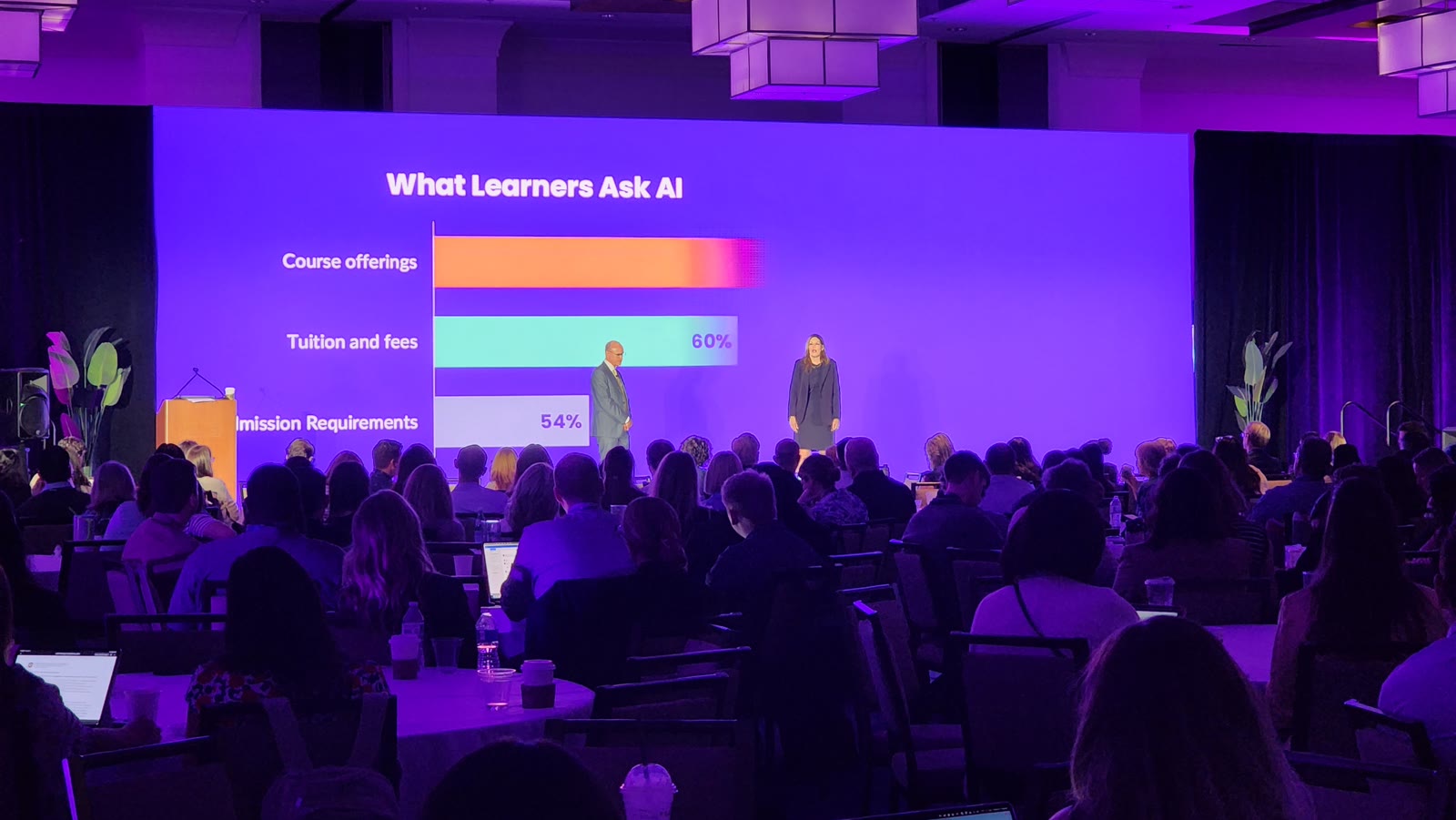
A 49.2 × 16.4 ft (15 × 5 m) LED wall at The Westin Fort Lauderdale Beach Resort, installed with original Unilumin ground support.
See the work →Ask us for the final pixel map before your designer exports the video. The wall’s physical dimensions are not the file resolution, and a wide backdrop may need a different layout from a standard presentation. The playback operator also needs to confirm file format, frame rate and audio. Send the original files, mark the final versions and include the playback order so they can be tested before rehearsal. Content design or editing is quoted separately unless included.
Send a sample presentation and the seating plan. We review screen dimensions, the farthest viewer, text size, contrast and any camera image sharing the screen. A finer pixel pitch alone cannot fix a slide filled with tiny text. Depending on the room, a larger display, simpler slide layout or additional screens may be more useful.
Usually, yes. Tell us the computer model and which video output or adapter you use, and mention any videos with sound. We need to check the signal path through the selected switcher, processor and screen, not just whether the cable fits. Bring the actual laptop for the agreed test and open the presentation with its linked files. Streaming or protected content needs checking in advance too.
A roof alone does not establish suitable operating conditions. The exact panel, connectors, exposure to rain or condensation, wind and electrical protection need review. Tell us how long the screen will be outside and send photos of the position. We select a system for the actual exposure rather than treating an indoor package as an outdoor rental.
That depends on the full equipment load and the circuits available. Send the venue's electrical information and tell us what other equipment shares the supply. LED panels, processing, sound and lighting must be considered together. We identify the required circuits and connectors for the selected system and coordinate the final distribution with the venue and qualified personnel.
The price depends on the screen dimensions, LED system, rental period and services you need. Equipment collected by your crew has a different cost from a wall delivered, built and operated at the venue. Send the date, location and an example of what you want to show. We check viewing distance, access and working hours, then itemize equipment, transport and labor. The LED calculator can help compare initial options; its estimate does not confirm the final price or reserve equipment.
Yes. We can quote equipment only or add technicians for the tasks your crew needs help with. Send the equipment list, signal formats and who will handle installation, processing, playback and show operation. We agree on the handover and the technical contact before delivery. If you are supplying your own client, we can work under your production company’s name and keep your client relationship with your team. Rental conditions and any partner pricing are confirmed in the proposal.
Possibly, but matching pixel pitch is not enough. Send the manufacturer, exact model, cabinet dimensions, receiving-card details and processor, plus photos of the labels. Panels also need compatible mechanics and configuration; different batches may look different in color or brightness. We need to check the proposed combination before confirming that the cabinets can form one continuous wall. If they do not match, a separate screen may be a more practical option.
No. Start with the date, location, screen size and what you want to show. We select processing to suit the panels, content and incoming signals. A computer or media server supplies the images; processing can resize or arrange them, and the LED controller sends the image data to the cabinets. Some units combine those functions. The quote identifies the processing, cabling and setup included. If your crew is bringing part of the system, tell us what it is so we can check the connections.
It depends on the cause. We need to distinguish a setting or calibration-data issue from differences between panel batches, wear or a faulty module. Lowering brightness or changing white balance is not the same as measuring and calibrating a screen. Specialized calibration requires appropriate equipment, software and panel data; it is not automatically included with setup. If you already own the wall, send photos, the panel model and details of any replacements. We review the system before proposing a correction, without promising that different batches will become identical.
A wall that looks uniform at full output may show tinted grays, steps in a gradient or lost shadow detail when dimmed. The panel electronics, processing and calibration all affect that result. For a shoot, test representative content at the intended camera exposure and screen brightness, including dark scenes and skin tones where relevant. A full-white test alone will not show these issues. Send a sample of the content and the camera plan so the test can be included in preparation; changing the brightness on the day may require another check.
Yes. Start with the event date, venue and what you need to show: presentations, videos, live cameras or several feeds. Photos of the screen and equipment labels help, but you do not need to identify every component before contacting us. We can discuss playback and video support and coordinate the signal handover with the screen supplier. Before confirming the job, we need to establish the accepted input format, who controls the LED settings and what can be tested before the event. Work on the screen’s configuration needs a separate compatibility and technician check.
Start with the venue’s access window, not just the time guests arrive. Unloading, moving cases to the room, building the support, assembling panels, wiring and testing all take time. A screen at ground level and a flown wall can have very different schedules, even at the same size. Send the load-in and load-out times, access details and stage plan. We work those into the installation schedule with the venue and your production team, leaving time to check the actual presentations or show files before rehearsal. A fast panel assembly does not mean the whole system is ready.
The technician first needs to identify whether the fault is in the source, signal path, power supply or panel. Those problems do not all call for a replacement module. Before the event, agree on the technician’s presence, compatible spares and access to the screen; these are items to check in the quote. A spare in a case is of little help if scenery blocks the component that needs replacing. Any intervention must follow the equipment procedure and the conditions on site. The response may require a pause or a change of output; we do not promise an invisible repair while the show continues.
Send the space available, even if you do not know the panel size. An LED wall is built from complete cabinets, so its dimensions follow the cabinet grid. With our 500 × 500 mm P2.6 cabinets, a flat rectangular wall changes in 0.5 m steps; a requested width of 4.2 m does not fit that grid exactly. We would compare suitable sizes with you before finalizing the design. A tall, narrow layout is possible without rotating the cabinets, provided the support and content are designed for it. Leave room for the support, cables and service access as well as the visible image. Once the layout is agreed, we provide the pixel map for the content team.
Do not plan access around the screen dimensions alone. Depending on the equipment and route, cabinets can travel in protective cases or on a suitable touring dolly. We confirm the transport arrangement for the job; a dolly does not automatically mean the wall can roll into position fully assembled. Door widths, freight elevators, ramps, loading areas and space to store empty cases all matter. Quick cabinet locks help with handling, but they do not determine the crew needed for unloading, support construction, electrical work, cabling and testing. Send the venue access information and the work your crew will cover. We can then define delivery, installation and staffing in the quote.
Those terms usually describe the LED package, not the colors the screen can display. A dark package and matte mask can reduce reflected room light and help dark parts of the picture stay dark. That matters when stage lights hit the screen or the background is visible on camera. It does not make every black LED panel the better choice outdoors: usable brightness, viewing angle and the light falling on the wall still matter. For a rental, tell us whether the screen faces daylight, which lighting will remain on and whether it will be filmed. We compare the actual panels and content under those conditions. A color label alone cannot predict camera performance.
A large screen can still be hard to see from some seats. Send the seating plan with the stage, lectern and any columns or scenery marked. The screen’s lower edge may be hidden behind people, and a seat far to one side can have a poor view of the image. Raising the wall is not always the answer: it changes the support requirements and can make viewing uncomfortable for the front row. We review the position along with the screen size and actual presentation. Moving the screen, adjusting the seating or adding a relay screen may be more useful than increasing the main wall’s size. Any extra screens and their signal feeds need to be included in the quote.
Only when those services are listed in the proposal. Equipment-only rental, delivery to a loading dock and a wall ready to use in the ballroom involve different work. Check who unloads, moves cases, assembles the support, connects power, tests the picture and removes the system. Confirm pickup and strike times too, especially when the venue requires removal overnight.
Yes, you can request technical support separately. Tell us whether the job is installation, LED setup, playback, switching or show operation, and identify the equipment already on site. We check the system, the tasks and technician availability before confirming the booking. Access to the processor and cooperation from the equipment supplier may be needed; one operator should not be assumed to cover every position in the production.
Not necessarily. Equipment may remain installed while operator hours change from day to day; delivery and strike also follow their own schedule. Include rehearsal days and any periods when the equipment must stay reserved at the venue. We quote the complete dates and work involved, rather than applying a universal extra-day discount. A change to the show schedule can require a revised proposal.
Standard HD video can often be used, but we need to agree on how it fits the wall. The cabinet layout and each cabinet’s pixel resolution define the native canvas; a wide or tall wall is not automatically 1920 × 1080 or 3840 × 2160. Preserving the video’s proportions may leave unused areas, while filling the screen can crop the image. Ask for the pixel map before producing custom graphics, and test existing videos with the playback operator before the event.
That depends on the venue and the layout. Ground support carries the wall from the floor and needs an appropriate base, room for the support and suitable floor conditions. A flown wall is suspended from an approved structure and requires a compatible rigging design. Neither method can be selected from screen area alone. Share the stage plan and venue restrictions so the support, sightlines and installation work can be reviewed together.