Live images on the room screens
Let the audience see the speaker, a demonstration or the action on stage. We define what each screen shows and review picture and sound timing.
Ask about cameras for room screens Get a quote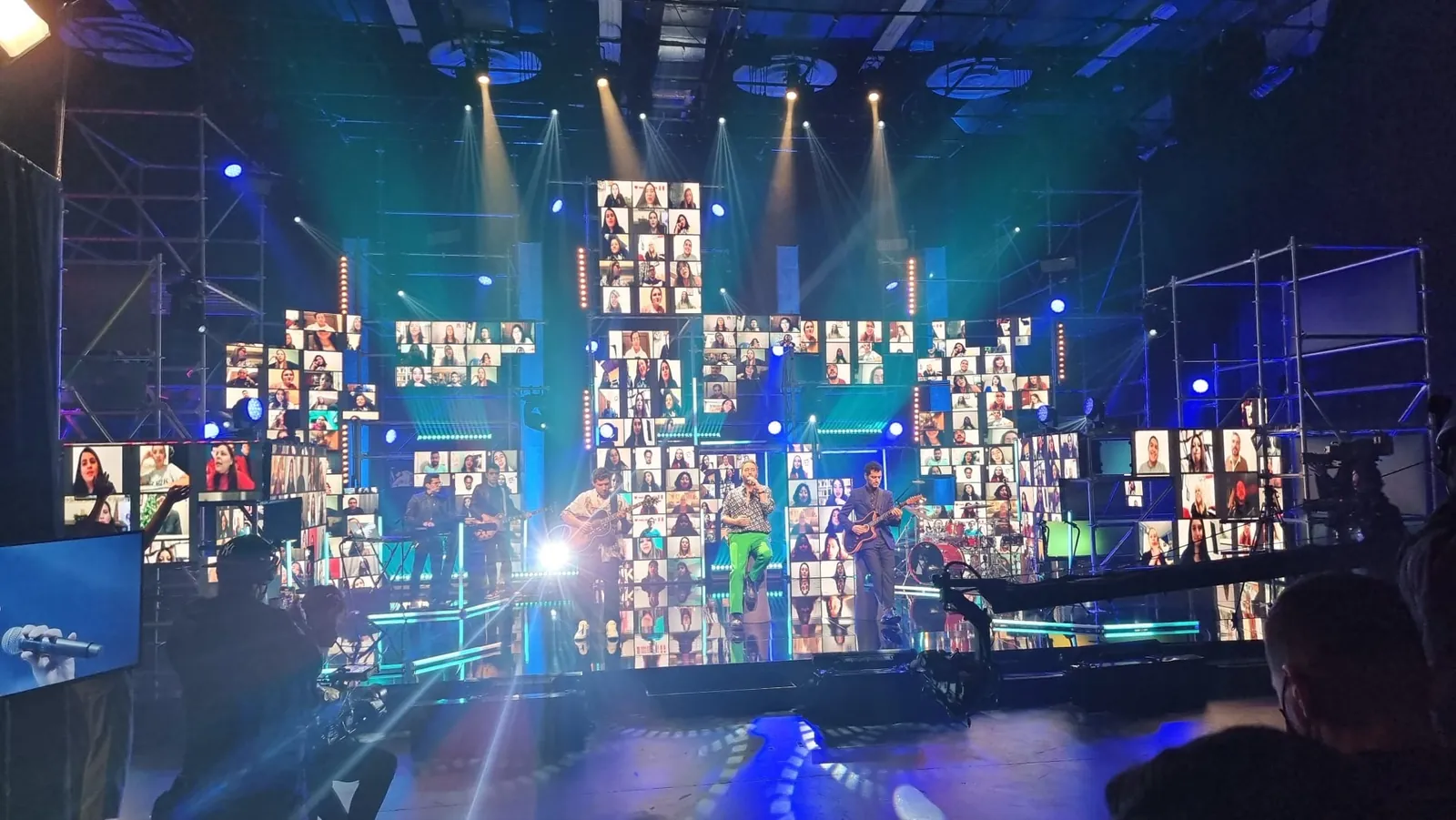
The camera and video inquiry buttons keep Orlando as a reference. The equipment list in your cart is reviewed separately. Confirm the city and venue when you write to us.
From Miramar, we plan transport and crew for your event in Orlando. We prepare the proposal around the venue, schedule and live images or recordings you need, and check availability for your date.
Orlando has been removed as a reference. Your camera and video options, project reference and any existing equipment list are kept.
The camera and video inquiry buttons keep Miami as a reference. The equipment list in your cart is reviewed separately. Confirm the city and venue when you write to us.
From Miramar, we plan transport and crew for your event in Miami. We prepare the proposal around the venue, schedule and live images or recordings you need, and check availability for your date.
Miami has been removed as a reference. Your camera and video options, project reference and any existing equipment list are kept.
Capture · IMAG · streaming
Cameras, video switchers, recording, intercom and streaming for events in Miami and South Florida. Choose equipment for your production or add preparation, setup and operation; we help you put the system together.
What it does
Use cameras to show presenters on the room’s screens, record the program or reach an online audience. Live camera feeds on event screens are often called IMAG. We plan cameras, switching, capture, monitoring and communication around the event schedule and required outputs.
GLMedia supplied the LED screen and filmed the Mother’s Day gathering.
See the case and video →You may need one or several of these services. Tell us what each audience should receive and what you want to keep afterward. You do not need to choose cameras or switchers before contacting us.
Let the audience see the speaker, a demonstration or the action on stage. We define what each screen shows and review picture and sound timing.
Ask about cameras for room screensTell us where you want to stream, your planned schedule and whether remote guests will take part. We prepare the picture and audio feeds, operation and tests. We also review the venue’s internet connection and backup options, which are quoted separately.
Ask about live streamingChoose the program as it went live, individual camera recordings or both. Each option gives you different material to use after the event. We plan the feeds to record, recording supervision and the storage required.
Ask about program or camera recordingsYou can request files for your editor or add an edited video. Tell us how you plan to use the footage and when you need it: we plan the format and delivery and quote editing as an additional service alongside filming.
Ask about files or edited videoOptions for your camera and video system
Rent equipment for your crew, add setup and testing or include operators during the event. We help you choose a combination that fits your production and organize preparation, access and schedules.
Current systems reference
GLMedia prepares camera and video systems around the live images and recordings your event needs. We arrange the Blackmagic ATEM models in this selection through our technical partnership; our crew has hands-on experience configuring and operating them. We check availability for your date and select the cameras, connections and outputs for the project.
10 standards-converted 12G-SDI inputs · 6 12G-SDI outputs · 4K program/preview and IMAG workflows
20 standards-converted 12G-SDI inputs · 12 auxiliary outputs · multi-destination 4K production
8 standards-converted 3G-SDI inputs · streaming and recording · ISO and remote-camera workflows on HD8 ISO
professional 4K live-production switching operated by experienced GLMedia personnel
compact HDMI switching for streaming, presentations and hybrid events
1 compact 8-channel switcher · 4 SDI + 4 HDMI inputs · ISO production and streaming
Large-sensor cinema and live-production camera
Remote camera family · exact model confirmed per project
12× optical zoom; Clear Image Zoom up to 18× in 4K or 24× in HD. Fluid tripod, monitor and zoom remote.
Fluid-head support system
1 mobile system for switching, multiview, networking, intercom, wireless video and recording
1 notebook with licensed vMix Pro · I/O and capture configuration confirmed per project
1 monitor-recorder · exact model confirmed per project
1 wireless intercom package for up to 12 users
Wireless video system · receiver configuration confirmed per project
2 multiview monitors and 3 Gigabit network switches
Equipment rental and operation options
Yes. Tell us what you want to connect: cameras, presentation laptops, room screens or a streaming computer. Add the date and venue if you know them, the equipment your crew is bringing and what you need from us. If you have a signal plan, include connections, resolution, frame rate, computer or production platform and outputs; we can also help prepare it from the equipment models you know and the result you want. We check compatibility and availability to select the switcher or capture system, cables and configuration for the quote.
Yes. We prepare cameras, switching, recording, intercom, streaming equipment and technical crew for live events. Tell us whether the program is for room screens, an online audience or both. We build the proposal around the feeds, operators and tests, and detail the options for internet, platform access, recordings and backup so you can choose.
Tell us what you want the audience to see
Send the date, venue and program. Tell us if you need equipment only, setup or operation, what the room and online audiences should see, and which files or video you want delivered. Start with the information you have.
Request a camera and video quote ↗See camera equipment WhatsAppThe button opens Contact with this camera and video page as a reference, which you can change or remove. Enter your name, email and message and send your inquiry when ready. We can start with the information you have while the date, models or signal plan are still being decided.
Tell us what the room audience needs to see, what will be shown online and which files you want delivered. You can attach photos, plans or a rider in JPG, PNG, WebP or PDF: up to 3 files, 4 MB each and 10 MB total. For larger files, email us or arrange how to share them through WhatsApp. You can also start without attachments.
Ask or share the plan by emailYou can add filming to an LED screen rental; we prepare and quote it as an additional service. The screen can also show slides or finished videos without cameras. For event coverage, we help you choose live images in the room, streaming, recording or a combination. Afterward, you can receive the program as it went live, separate camera files or an edited piece; editing is quoted as an additional option alongside recording. We plan coverage, audio, operators, file formats and delivery timing. Individual camera recordings require the corresponding recording equipment and storage to be planned.
To prepare the stream, we review a wired connection, available upload capacity and platform restrictions with the venue’s network contact. Guest Wi-Fi needs testing before it can be considered: a fast download does not show that it can sustain an outgoing stream. Test from the event room with the intended equipment and settings, checking the received picture, sound and stability; a phone in the lobby does not reproduce those conditions. We coordinate internet provision and testing with the venue and evaluate backup connectivity, quoted separately when added.
Yes. We prepare the connection so the remote speaker can hear the room, receive a return picture and send their camera feed. Tell us the platform, who will speak and whether there will be audience questions. The audio return excludes the speaker’s own voice: this is mix-minus. We rehearse with the microphones, computer and connection to be used at the event to check levels, echo, delay and slides. A question from the room tests both directions. This lets us plan return feeds and operation with the actual event system, even if an earlier video call worked well.
Yes, if the system is planned for those separate outputs. The room may need a close-up of the speaker while the stream shows the speaker beside the slides. We identify which feeds can be shared and which need their own switching, graphics or layout. Recording the finished program and recording individual cameras are different deliverables, with different equipment and storage requirements. Audio needs its own check too: an online audience cannot rely on the sound heard in the room. Tell us what each audience should receive and which files you need afterward, so the quote includes the outputs, operators, recording and tests required.
Start with an idea, or review the options for room screens, live streaming, recording and file delivery. Equipment and crew tasks are defined for your event.
You can choose whether Google Analytics and Google Ads measure visits and actions on this page. Service information and inquiry links work with either choice.
You have not chosen yet: the measurement tag will not load on this page until you accept.
Review shots, lenses, camera positions and the video paths with your crew. The camera guide explains model-specific controls and checks; the recording and delivery guides help define the files you need after the event.