Disguise VX4D-441002
1 media server for advanced playback and show control
 Get a quote
Playback · mapping · signal
Video equipment rental and technical operation for presentations, live cameras and LED playback in Miami and South Florida.
Only name, email and message are required in Contact. You carry an editable reference and review before sending; models and connections can remain undecided.
You can rent a switcher, media server or LED processor, or ask us to prepare and operate the video system. A presentation on one screen needs a different setup from cameras, slides and video running across several displays. Tell us the date, venue and what you want the audience to see; you do not need a finished equipment list to ask for a quote.
Choose equipment, preparation or operation to fit your production. Start with a sketch or a description of what you want the audience to see. We review available equipment, connections and schedules with you to build the proposal.
Equipment-only rental or cross-rental to complement your system
Ask about equipment onlyAdd delivery, configuration and pickup to your rental
Ask about setup and configurationA video operator working with your production team
Ask about a video operatorA coordinated system for LED, cameras, presentations and playback
Plan a coordinated systemSignal planning and tests based on the sources and screens in use
Review existing signals and equipmentRent the equipment or add preparation, delivery, setup, connections, configuration, testing, operation and pickup. We plan the system and technical crew around your screens, sources, rehearsal schedule and event.
We review final files, approved versions and show cues with your production team. Bring your content or ask about creation and editing, then choose the programming and operation you need. We itemize these options so the work fits alongside your team.
We integrate video with the screens and equipment planned for the event. With the screen team, we gather the pixel map and hardware details, check compatibility across the signal chain and coordinate configuration changes with the technician managing it.
We coordinate access, power, cable routes and connections with the venue. For networked video, we work with its IT team on configuration, testing and support during the event.
Our technical AV production fits into your event program: we prepare signal paths, playback and operation with your team. You can also add backup and show support; we help choose which parts of the system need backup and include them in the proposal.
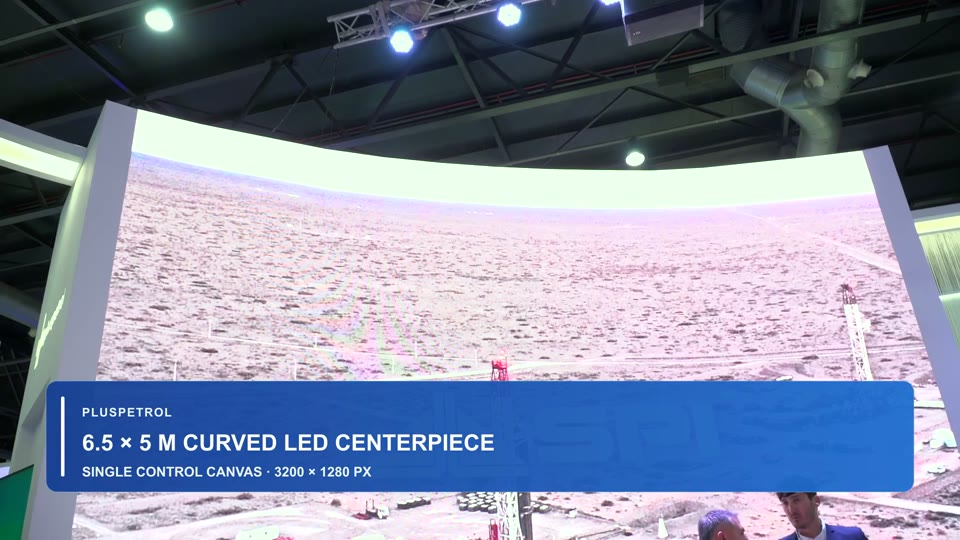
At AOG 2025 in Buenos Aires, Argentina, GLMedia and Eventos Globales delivered the joint technical implementation of the Pluspetrol booth. The case documents playback and content distribution across one curved LED wall and eight faceted displays.
See the video system →Current systems reference
GLMedia prepares processing systems with its own equipment and access to the Blackmagic ATEM models shown here through our technical partnership. Our crew has hands-on experience configuring and operating them. We select models, connections and quantities for the project and check availability for your dates.
Ask about this equipmentBuild a preliminary list if you already know the equipment. Rows grouping several models add a general reference: specify the model and quantity you want in your message. We review the selection and availability with you to prepare the quote and arrange a booking.
1 media server for advanced playback and show control
Intel i7 · RTX 4070 · 64 GB · Blackmagic 8K
Licensed content playback and mapping software
H9 × 1 · H5 × 3 · H2 × 8
VX16S × 1 · NovaPro UHD × 2 · VX1000 × 10 · VX400S × 20 · VX4S × 12
CVT4K × 4 · TB40 × 20 · TB8 × 8 · TB2 × 10 · TB1 × 10
2 × 16-inch M1 Max, 64 GB, 2 TB SSD · 1 × 16-inch 2024 M4 Max, 48 GB, 2 TB SSD
Latitude, Precision, G15 and G16 series · multiple units; specifications confirmed per project
4 × 65-inch TVs · 8 × 55-inch TVs · 2 × 55-inch confidence monitors · 2 × 42-inch confidence monitors · 6 × 32-inch monitors · 8 × 27-inch monitors
10 standards-converted 12G-SDI inputs · 6 12G-SDI outputs · 4K program, preview and IMAG
20 standards-converted 12G-SDI inputs · 12 auxiliary outputs · multi-destination 4K production
8 standards-converted 3G-SDI inputs · streaming and recording · ISO and remote cameras on HD8 ISO
Start with the date, venue and what you need to show
The button opens Contact with this page as an editable reference and the video service selected. Add the information you have and press Send inquiry when ready. You can also reach us by WhatsApp or email.
Open a video inquiryLED calculatorVenue or city, dates, and preparation, rehearsal, program and removal hours. Tell us whether you need equipment, configuration, an operator or a coordinated system so we can review crew and availability.
A simple drawing showing computers, cameras and what each display should show helps distinguish repeated feeds from independent content. Include any known models, connections, maps and versions; missing details can remain to be confirmed.
Tell us what you want to show, who prepares the files and who calls the cues. Add any equipment details and schedules you know. Attach photos, plans or a reference in JPG, PNG, WebP or PDF: up to 3 files, 4 MB each and 10 MB total. For a full project or larger videos, we can arrange how to share them. You can start without attachments.
These links prepare a general video subject. Add details and send from your app; they do not include your Contact draft or files.
Explore playback sequences, display connections, live camera workflows and project preparation with sources and checks for the actual show system.
Yes. Send the model you need, if you know it, and the dates. You can also ask for an operator to work with your existing equipment or production team. For a complete system, tell us who is supplying the screens, cameras and content. Book an operator for your equipment or add a media server, preparation, delivery and content creation. We itemize those options in the quote so you can choose how to complete your production.
Not for every presentation. A laptop may be enough for slides and a few videos on one screen, with compatible processing between the computer and the LED wall. A media server becomes useful when content must be mapped across several surfaces or run in a programmed sequence. A switcher selects and mixes live sources; an LED processor configures the signal for the panels. Some devices combine functions, so we choose the system around the show.
Ask for the content template before the final export. It should identify the pixel dimensions and the part of the image shown on each surface. A wide LED wall is not necessarily a 16:9 screen, and a 4K file alone does not tell us how it should fit. Confirm the codec, frame rate and audio with the playback operator. Send the original files, fonts and linked media used in presentations, plus a short list showing each file’s playback order and current version. If you send a download link, check that the assigned team can access it. Label replacements clearly so an earlier version is not mistaken for the final one. You can also add editing and content creation as itemized options in the quote.
Ask about preparation and testingUsually, yes. Tell us the model, video connector and presentation software, and whether the presentation has sound. We also need to know where the laptop will sit, because the cable route affects the connection. Bring the actual computer and power supply for the test. Protected streaming content can behave differently from a local video file, so flag it in advance. We check the intended source and signal path before the event.
Yes, when the system has the outputs and processing required for each destination. A distributor can repeat one feed; independent content needs separately routed or generated feeds. LED, projectors and monitors may also need different output resolutions or image layouts. Send a simple drawing that says what each display should show, including any presenter monitors or overflow rooms. We check routing, scaling and timing rather than assuming every output is identical. Where images must join across displays, synchronization needs a specific test. The Pluspetrol booth at AOG 2025 is a documented multi-surface LED setup implemented jointly by GLMedia and Eventos Globales.
Plan a test with the camera department before the shoot. Send the camera model, recording frame rate, shutter speed or angle, and whether a shared genlock reference is available. Moiré and scanning bands are different problems: lens, focus and distance affect the first; timing and shutter settings affect the second. On compatible Brompton Tessera systems, ShutterSync adjusts LED refresh timing for the camera exposure and requires genlock; it does not replace a camera test. We review the actual panels, processor, content and intended shots together. Not every event needs that configuration, and a high refresh specification alone does not guarantee a clean recorded image.
You can add backup playback: we select the configuration and tests for your program and itemize them in the quote. Keeping a copy of the files is different from having a second computer ready to take over. That computer needs the current show files, the media they use and the software required to run them. If a presentation or video changes after the test, tell the operator so the backup can be updated too. We agree which parts of the signal path need backup, who makes the change and what the audience should see while the show resumes. The proposal brings together equipment, preparation, operation and test time.
Tell the assigned technician which screen or source is affected and whether the problem is constant or intermittent. Leave the connections and settings as they are unless the operator asks you to change something. In an equipment-only rental, use the support contact agreed at handover. When preparing the rental, we help you choose support, on-site assistance and replacement equipment options, and provide the contact and procedure for using them.
Yes. Tell us whether you need someone to run an existing show or to prepare and program it as well. Send the dates, location, server model and Designer version, plus the rehearsal schedule. We check the job and operator availability before quoting. Server rental, programming days, show operation and content creation are separate items; let us know which ones your team already covers.
Send the project together with its media, the software version used to save it, a screen layout and the output map. Include the cue list or running order, and explain who calls the cues. Flag any external control, live inputs or licensed plugins. A video of the previous show helps us understand the intended result, but it does not replace the project files. Allow preparation time to check missing media, outputs and playback on the system that will be used.
Playback covers preparing and running the content: loading files, arranging cues and sending each image to its destination. Video engineering covers the wider signal path, including cameras, switchers, routing, processing, monitoring and synchronization. On a simple presentation, one person may handle both. With several live sources or separate screen feeds, we plan playback and engineering positions to handle content playback and camera and signal paths during the show. The proposal details the crew and preparation time needed.
Ask about tasks and crewNo. Timecode identifies a point in a sequence and can be used to trigger or follow playback. Genlock aligns video timing between compatible devices. Receiving timecode does not by itself mean that the video outputs are synchronized. If your production specifies house sync, cameras or several servers, send the signal diagram and required frame rate so the video team can check the configuration and plan a test.
Yes. We help you choose a controller that works with your wall and is available for your project dates. Send the panel and receiving-card models, cabinet count and pixel dimensions, current controller and the signal you plan to connect. A receiving card is the board inside the cabinet that receives image data and drives the modules through the panel electronics. The connector alone does not establish compatibility. We also need to know whether your technician will configure the wall or whether you need that work quoted. La Birra Bar in Doral is a documented GLMedia sale using a VX1000 and a media player; that setup is specific to that installation.
Not necessarily. Processing is sized around the actual pixel canvas and signal format, not square footage alone. Two walls with the same physical size can have different pixel counts because of their pixel pitch. We check total capacity, maximum width and height, load per output, input format and the cabling layout; dividing pixels evenly by the number of ports is not enough. Mapping then assigns each cabinet to its position in the image and follows its cable order. If several processors are needed, image distribution and synchronization must also be planned. Backup is a separate requirement from additional capacity. Send the cabinet resolution, a layout drawing and the intended frame rate so we can check the system before quoting.
Start with the controller and receiving cards, not the software name. VMP is used with the COEX ecosystem; NovaLCT remains relevant to other NovaStar control systems and maintenance tasks. They are not interchangeable for every job. Check the supported hardware, firmware and configuration files for the specific system before making changes. Send the model labels and current software version with your request. Keep the working configuration backed up; installing different software is not, by itself, a fix for an image problem.
A useful spare is prepared and tested as part of the system. A replacement controller must work with the installed panels, signal format and cabling, and have the correct configuration ready. A backup input, a second controller and redundant panel connections address different failures. Whether changeover is manual or automatic depends on the hardware and setup; the test must also check whether the picture is interrupted. Do not assume a spare means an invisible changeover. Tell us which part must keep running so we can quote the equipment and testing needed. Power, panels and playback content need their own backup measures, which we assess separately.
It can be part of that workflow when the server output and the installed processor input support the required resolution, frame rate and signal format. Disguise runs the content and sends video; the Colorlight control system then distributes image data to compatible receiving cards in the wall. That distinction between playback and LED control also applies to workflows using NovaStar or Brompton Tessera. An upstream switcher or scaler, including an appropriate RGBlink model, may handle sources and image sizing; it does not by itself replace the LED controller. Check each device’s role and the complete signal path. Changing the server is different from changing the sender or receiving cards, and matching connectors alone do not establish compatibility.
No. Video frame rate describes how many picture frames are supplied each second. LED refresh describes how the panel drives and refreshes its LEDs; it is not a count of new video pictures. A high refresh specification does not mean the wall can accept any high-frame-rate signal or will look clean at every camera shutter setting. The source, processor, receiving cards and panels must support the chosen format. For slow-motion filming, send the recording frame rate and shutter settings as well as the video feed format.
Delay can build up in the camera, format converters, switcher, processor and display. That is why a processor's latency figure is not the delay of the complete system. For live image magnification (IMAG), tell us whether the audience can see the performer and the screen at the same time. We review the signal path and plan a test with the equipment selected for the show. Low-latency modes can involve capacity or source requirements, so they need checking before use. Adding audio delay does not remove the delay in the picture.
The hardware and task determine that choice. LEDSETTING covers screen and cabinet configuration; iSet includes layout, processor control and monitoring; ColorAdept provides control and image tools for supported systems. These are not three interchangeable downloads. Check the processor, receiving cards, firmware and operating system against the relevant release notes. Colorlight currently labels LEDVISION as discontinued, but that does not mean an older working installation needs an immediate update. Keep its software version and configuration files available. LEDUpgrade handles supported firmware updates; installing it is not a general remedy for a blank screen. For an event using someone else’s wall, agree with its supplier who may change those settings.
A cabinet file describes how its receiving card drives that particular panel. The screen map is a different part of the setup: it places cabinets in the image and follows their cable order. A file from a panel with the same pixel pitch is not automatically suitable. Before making changes, the responsible technician should identify the hardware and preserve the working parameters, mapping and calibration data where the system allows. If only part of the wall is black or displaced, note which cabinets are affected and what changed beforehand. That pattern helps separate a source or mapping issue from a connection or panel fault; it does not establish the diagnosis on its own. Avoid resetting or overwriting the system just to try a different file.
Yes, with the sources connected and tested before they are needed. The operator checks the next source on preview, then sends it to program—the feed the audience sees—on the agreed cue. That requires the right switcher mode, monitoring and compatible input formats; a spare connector alone is not enough. We also check audio, presentation mode and computer notifications. A direct laptop connection may be enough for a simple presentation, but it leaves fewer options for preparing the next source while the current one stays on screen. Send the running order and tell us who calls the changes, including any last-minute laptops.
Start with the cable route, not the straight-line distance between the equipment. We need to know the source, destination, resolution and frame rate, plus any venue patch points. Depending on that route, the system may use SDI, suitable HDMI extension or fiber. A converter changes the signal interface; a distributor repeats a feed; a matrix routes sources to selected destinations. Those jobs can be combined in one device, but they are not the same. We check the complete path, including adapters, receiver units and their power supplies. If the design uses IP video, the network and its available bandwidth also need review; an available network socket does not prove it is ready for production video.
The image may have too few usable tonal levels somewhere in the chain. Start with the original file: compression or a low-bit-depth export can already contain visible steps. Then check the playback output, processing and panels at the intended brightness. Input bit depth and the panel’s advertised grayscale figure describe different parts of that chain; one large number does not guarantee smooth gradients. Dimming can also affect the tonal detail a particular LED system reproduces. This kind of banding follows the image’s gradients and needs a different diagnosis from moving scan bars seen only on camera. Send an original clip and describe whether the steps are visible to the eye, in the recording or both. That helps plan a useful comparison test before changing settings.
Only after checking the proposed system with the venue’s IT team. Internet access and a local network for AV-over-IP serve different purposes; a working wall socket does not establish that it can carry your camera or playback feeds. We need the equipment and protocol, source and destination count, video formats and connection locations. The network review then covers available bandwidth, switch configuration and, where the system uses it, multicast traffic. We coordinate switch provision and configuration, testing and the event support contact with IT. Some jobs are simpler with a separate production network or SDI and fiber links. Network design, equipment and support must be defined for the project before the connection is confirmed.
Two drawings help: one showing the screens on stage, and another showing where each screen sits in the video signal sent to the processor. For each surface, include its pixel width and height, position in that signal and orientation. Label the processor inputs and agree on the signal resolution and frame rate. The physical layout and processor map may look different. In Resolume Arena, Input Selection chooses the content area; Output Transformation places it in the outgoing signal. Send the dated map to both the content designer and operator, then check it with an identification pattern during setup.
Confirm the playback requirements before converting the whole delivery. DXV is useful for layered playback in Resolume, but a 10-bit workflow needs a different codec and a compatible signal chain. Send a short sample with the gradients, logos and transparency used in the final piece. If an overlay needs a transparent background, that transparency must exist in the source; selecting an alpha export option cannot create it. Keep the original master and agree on the final format with the operator. Test the files with the actual composition and outputs, including audio cues, before replacing the approved show files.
First tell the video operator whether the processor detects an input signal. A working preview does not prove that the correct physical output is active. During setup, check that the computer detects the display, that Resolume is assigned to it rather than a virtual output, and that the processor accepts the selected format. Test a known signal through the same cable path. If a USB dock is involved, identify its technology: Resolume documents problems with DisplayLink docks. Avoid changing several settings at once. During a live show, follow the operator’s agreed recovery procedure instead of unplugging equipment or resetting the LED configuration.
They cover different connections. Spout on Windows and Syphon on macOS share video between compatible applications on the same computer. NDI can carry video between computers over a network. Before choosing a connection, identify the sending and receiving applications, their versions, resolution, frame rate and whether transparency is needed. For NDI, agree on the network path with the venue’s IT team and test the full feed, not just whether its name appears in the source list. For a live camera shown beside the presenter, also check the visible delay. The choice of connection does not replace that test.
You can choose whether Google Analytics and Google Ads measure visits and actions on this page. Service information and inquiry links work with either choice.
You have not chosen yet: the measurement tag will not load on this page until you accept.
Before changing cables or formats, identify whether the destination shows “No signal,” a black image, a frozen image or just one dark area of the LED wall. Compare the operator monitor with the audience screen, and note the last point where the correct source appears. The guide puts the tests in order and includes a worksheet for recording each change without losing the starting configuration.
Check files by server, selected versions, preview proxies and image sequences. The full guide includes three downloadable checklists for delivery and support.