Virtual production studio rental & turnkey installation · Miami
LED sets for filming and permanent virtual studios.
Rent an LED background, walls and floor for a shoot, or commission a permanent virtual-production studio at your facility. We supply and integrate the equipment; studio space, tracking and content services are confirmed separately for each project.
GLMedia can provide the system as a rental, sell a complete installation or build in phases around the client's room, workflow, team and budget.
Temporary rentalEquipment, installation and operation for a defined production period
Turnkey studio saleDesign, supply, integration and commissioning at the client's facility
Operational handoffTesting, documentation, training and support defined in writing
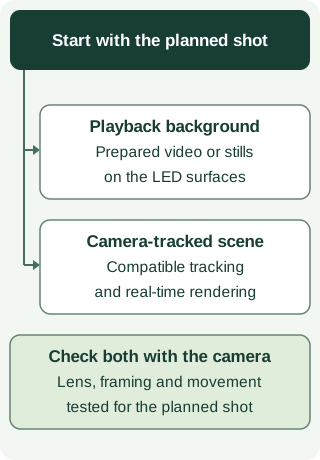
Playback background or camera-tracked scene?
An LED background does not by itself include camera tracking or real-time rendering. We define those resources, content and operators for the proposed workflow. Both options need camera tests; screen dimensions and pixel pitch alone do not approve the image.
Three commercial models
Temporary rental, purchase or expansion.
We compare rental, purchase, and expansion with you based on how often you shoot, the available space, existing equipment, and who will operate it. We define what is purchased or rented, how it will be installed, and the support each option needs before assigning equipment and tasks.
01 · RENTAL
Temporary studio package
You can combine LED, playback, processing, cameras, lighting, and technical operation for a shoot, campaign, season, or defined production window. We agree on the included equipment and tasks, installation and testing time, operation during the shoot, and removal afterward.
02 · SALE + INTEGRATION
Turnkey permanent studio
Workflow design, equipment specification and sale, installation, configuration, calibration and end-to-end commissioning at the client's facility. The system is delivered against an agreed acceptance checklist.
03 · HYBRID
Own the core. Rent the expansion.
The client owns the everyday cameras, control and display infrastructure while GLMedia provides temporary LED area, specialty processing, extra cameras or crew when a larger production requires it.
Request an equipment package for your technical team, or add preparation, installation and operation of the agreed systems. Tell us what your production team provides and whether you already have a location and content; studio space, tracking, rendering and post-production are confirmed for each project.
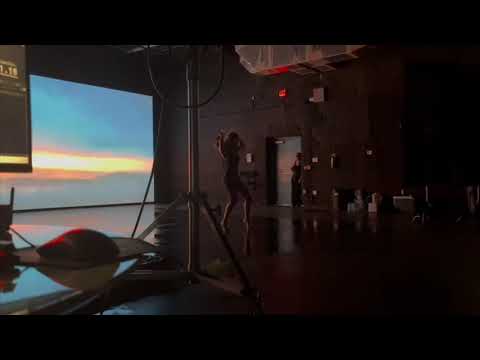
Real GLMedia production environment · Miramar, Florida
A GLMedia project
409 sq ft of LED around the subject.
A shoot in Miramar combined two Unilumin URMIII P2.6 LED walls with a walkable Unilumin UDF P5.2 LED floor, studio lighting and multi-camera capture. Approximately 409 sq ft (38 m²) of image was mapped across three planes.
That production used Sony FX30, Sony FX9 and Panasonic PTZ cameras. The project page shows the configuration and GLMedia’s technical work.
An LED virtual set can place talent inside branded graphics, architectural spaces, landscapes, product worlds or abstract motion while the production remains in one controlled room. The background is visible to the camera and can also contribute interactive light and reflections to the subject.
The result depends on the entire image chain: content resolution, LED pixel pitch, refresh rate, processor settings, camera shutter, frame rate, lenses, distance, lighting and playback must be planned together.
01
Music videos
Fast visual changes, performance environments and synchronized playback.
02
Commercials
Product worlds, controlled reflections, branded backgrounds and repeatable takes.
03
Broadcast segments
News-style desks, sports analysis, interviews, intros and program inserts.
04
Corporate content
Executive communications, training, product launches and virtual stages.
05
Streaming
Live or recorded programs with cameras, switching, monitoring and graphics.
06
Photography
Dynamic backdrops and controllable looks for products, talent and campaigns.
07
Agencies & producers
We coordinate LED, video, and signal connections with your production company to fit the system into the shooting plan and your technical team’s work.
08
Pilots & tests
Proof-of-concept environments before committing to a larger production.
Production options
Choose the system for the shots and content.
Start with the shots and the content. A playback background may be enough; a scene that changes perspective with the camera needs compatible tracking, rendering and specialist operators.
01 · LED BACKGROUND
Playback-based LED set
Pre-rendered motion, stills or branded content displayed behind talent. Camera-ready LED, playback and processing are synchronized, but the background does not need to change with camera movement.
02 · MULTI-SURFACE
Walls and walkable LED floor
Two or more LED planes share mapped content to surround the subject with image. Perspective is designed for the planned camera angles and performance area.
03 · REAL-TIME
Camera-tracked in-camera VFX
When perspective must respond to camera movement, we work with your team to identify the compatible tracking, real-time render engine, prepared content, and specialist operators needed. We confirm those resources for the project before including them in the quote.
04 · CHROMA
Green-screen virtual set workflow
Lighting, cameras, keying, monitoring and post-production interfaces can be planned for chroma-key projects. Studio space, virtual assets, live keying and post are defined as separate deliverables.
What a quoted set can include
LED, cameras, lighting and playback.
LED surfaces
Flat, curved or multi-plane Unilumin walls and walkable LED floors, sized for the composition, camera distance and movement area.
Content canvas
Pixel map, aspect ratio, safe areas, deliverable specifications, content tests and playback format for each LED surface.
Video processing
NovaStar processing, signal distribution, mapping, scaling, synchronization and project-specific redundancy.
Playback
Disguise, Resolume and other approved playback workflows selected according to output count, resolution, cueing and show-control needs.
Cameras & switching
Sony, Canon PTZ, Blackmagic ATEM, OSEE, vMix, recording, multiview and monitoring allocated according to the approved project.
Lighting & crew
Studio lighting, technical operation, system alignment, rehearsals and crew roles coordinated around the camera plan.
Preparing your proposal
Information for your proposal.
Share scene references even if the technical approach is still undecided. We review with you what will be live, pre-rendered, tracked, composited, or finished in post. From there, we define equipment, each team’s tasks, and the information still needed for a quote.
Creative and content
References, scene list, aspect ratio, final framing, content provider, playback files, color pipeline, licensing, branding and who approves the image.
Camera and performance
Camera count, lenses, frame rate, shutter, movement, tracking needs, talent positions, floor use, sound recording and whether the set must work from several angles.
Space and schedule
Studio or location, dimensions, access, power, HVAC, ambient light, floor loading, rigging, build time, rehearsal, shoot length and strike window.
Deliverables and coordination
Live program, isolated records, edited master, streaming destinations, post-production, virtual assets, real-time rendering, specialty operators and backup requirements.
A production-ready sequence
Plan the camera before building the wall.
The most efficient set begins with the intended shot and final deliverable. LED dimensions and content are then designed around what the camera must see.
Creative review
References, story, shots, talent, backgrounds and final destinations.
Technical design
We define LED geometry, camera angles, the pixel map, processing, playback, lighting, and power. With your production team, we agree on who prepares and approves content, connects signals, and operates each system.
Build & test
Installation, alignment, content checks, camera tests, color, moiré, exposure and rehearsal.
Shoot & handoff
Technical operation, cueing, recording, media verification, strike and agreed deliverables.
Frequently asked questions
What producers should confirm before booking or building a virtual studio.
Does every LED virtual production set require camera tracking?
No. Many productions use camera-ready LED backgrounds with pre-rendered video, stills or mapped content and do not require camera tracking. Camera-tracked real-time environments are a different workflow and require compatible tracking, render systems, content and qualified operators. GLMedia confirms which level is included before quoting.
Can GLMedia build a set with LED walls and a walkable LED floor?
Yes. GLMedia has documented a Miramar production environment using two Unilumin LED walls and a walkable Unilumin LED floor, with mapped content, studio lighting and multi-camera capture. The geometry, load, access, power and content workflow are engineered for each project.
What content can appear on an LED virtual set?
A set can display branded graphics, architectural environments, landscapes, abstract motion, product worlds, broadcast graphics or custom pre-rendered scenes. Content creation, licensing, playback format and real-time rendering are separate deliverables and must be identified in the proposal.
Can the set be used for music videos, commercials and corporate content?
Yes. LED sets can support music videos, commercials, interviews, product demonstrations, executive communications, news-style segments, sports commentary, social content and streaming. The technical design changes with camera distance, lens choice, sound requirements, talent movement and intended deliverables.
Can GLMedia also coordinate cameras, lighting and recording?
Yes. We can coordinate LED, playback, video processing, cameras, switching, lighting, monitoring, recording, and technical crew as detailed in the proposal. With your production company, we review what each team provides and how the signals connect. If you need audio, specialty cameras, tracking, real-time rendering, studio space, or post-production, we confirm the resources and services for that project and itemize them in the quote.
Can GLMedia rent a temporary set or sell and install a permanent studio?
Yes. GLMedia can quote a temporary equipment rental for a shoot, a turnkey permanent studio sold and installed at the client's facility, or a hybrid system that combines a client-owned core with rental expansion. A permanent handoff can include system design, equipment supply, installation, configuration, commissioning, documentation and operator training. Exact ownership, construction interfaces, warranties, support and acceptance tests are defined in the proposal.
Rental, purchase or phased build
Do you need one shoot—or a studio that stays?
Tell us what you want to film and the shots you have in mind, even if the location, date, dimensions, or equipment models are still undecided. Share any references and existing equipment you have. We review rental, permanent installation, or expansion with you and identify what needs checking to prepare the proposal and plan camera tests.
Open the equipment or software panel to read its technical notes and download the corresponding manual.
Sony FX30: camera reference for the shootEnglish PDF · 533 pages · 6.1 MiB · Sony 5-043-036-16(1)
If the shoot uses the Sony ILME-FX30, check that this manufacturer guide matches the camera’s firmware. For LED backgrounds, the Anti-flicker section explains variable shutter adjustment and checking the recorded image; it does not guarantee that every lighting frequency can be corrected. The HDMI section distinguishes recording to the camera’s card from output to an external device.
If the selected workflow uses vMix 29, consult the manufacturer’s user guide. Available functions depend on the edition and license specified for the project.
If the project uses Resolume, specify Avenue or Arena and the version before confirming the playback system. Projection mapping, edge blending and SMPTE timecode input require Arena. Define the outputs and cueing needs before choosing the edition.
Does renting an LED screen include filming the event?
No, unless filming is listed in the proposal. A screen can display a presentation without any cameras. If you need live camera images, a recording or a stream, tell us the destinations and deliverables. We define cameras, switching, audio feeds, recording, operators and file delivery separately, so displaying the event and producing a recording are not confused.
What video and presentation files should I send?
Ask for the final screen pixel map and playback requirements before exporting. Send the presentation with its fonts and linked media, and provide original video files rather than messaging-app previews when possible. Label the final version and the playback order. We check resolution, aspect ratio, audio and cue points; editing or creating content is a separate task unless included.
How much rehearsal time should we schedule?
It depends on the program. Send the number of speakers, presentations, videos, remote guests and live cues. A simple slide presentation and a multi-camera show need different preparation. We plan time for content checks, microphones, transitions and the people who call or perform the cues. Rehearsal needs access to the actual room and relevant presenters, not only the equipment.
Does an LED filming set need a ceiling as well as walls and a floor?
Only if the shots call for it. A ceiling can provide moving light and reflections from above, or enter the camera frame; a wall and a walkable floor serve different positions in the scene. Decide with the camera and lighting teams what must appear in the shot and what only needs to illuminate the subject. That avoids adding a surface with no clear purpose. Overhead LED requires suitable equipment, a reviewed suspension design and qualified personnel; a panel used on a wall is not automatically suitable overhead or underfoot. Send the shot list, camera movements, available height and reference images. We review any ceiling requirement separately. Our documented Miramar shoot shows two LED walls and a floor, not an LED ceiling.
Can an LED set add noise to an interview recording?
It can. Depending on the equipment, fans in the panels, processors or playback computers may be audible near a microphone. Air conditioning and lighting can add noise too, so a screen described as quiet does not make the whole set quiet. Tell us if you are recording dialogue, where the microphones and talent will be, and whether the equipment can sit outside the recording area. Include a sound check with the system running long enough to reach its normal operating temperature. That gives the sound team a more useful test than listening just after power-up. Equipment placement and microphone choice may help; ventilation must remain clear. Any low-noise requirement should be part of the brief before equipment and room layout are confirmed.