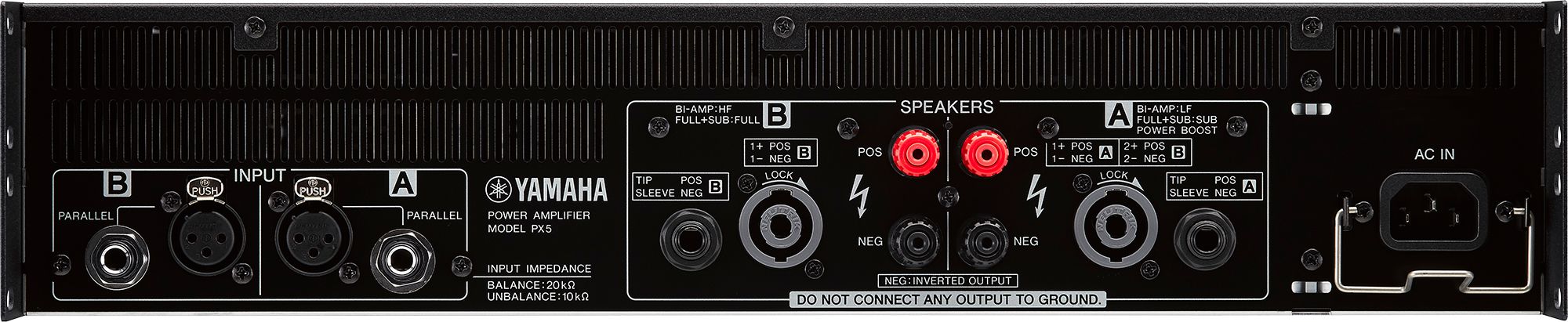
PX5: A/B controls and display in Yamaha’s image. The settings shown are illustrative.PX5: inputs and SPEAKERS outputs on the identified model. Follow its manual’s connection and load requirements.
If the Yamaha PX5 powers on without audio, or a speaker receives only part of the spectrum, trace the signal from INPUT to SPEAKERS. Check routing, filters and load before changing the level.
Model and scope
Manufacturer
Yamaha
Model covered by this guide
Yamaha PX5
Confirm the system and availability for your event date.
Questions and troubleshooting
The Yamaha PX5 powers on, but the speakers are silent: how do I separate input, mute, protection and output faults?
First check whether signal reaches the input and whether the amplifier allows it through. POWER only confirms that the unit is on. The HOME meter can show INPUT or OUTPUT; check that selection before interpreting a reading. According to Yamaha, SIGNAL indicates output level, but it does not establish that the cable and speaker work.
The manufacturer’s troubleshooting table distinguishes no input signal, low volume, MUTE, protection and no audio from output B in Power Boost. The proposed check follows that path with a known low-level signal; it still needs to be performed with the event speakers and cabling.
Record the speaker model, cabling, preset, ROUTING and SP TYPE before changing settings. Turn both volume controls down to prepare the check. Switch the amplifier off before connecting or disconnecting speaker cables; power up sources, mixer and processors before the PX5, and shut down in reverse order.
In Advanced, open MENU → UTILITY → HOME SCREEN and check METER = INPUT to see the incoming signal. If no level appears while the mixer shows signal, follow its output, the external processor and cable to the PX5 INPUT. SINGLE and PARALLEL use INPUT A; a source connected only to B does not pass through those modes.
If input is present, look for MUTE on HOME and PROTECT on the front panel. To change a channel mute, Yamaha specifies pressing the main knob together with [A] or [B]. Release mute only when the path is ready, with volume low. Then compare the meter in OUTPUT and raise the level gradually.
If PROTECT is lit, read the message and log before trying again: OUTPUT CURRENT OVER calls for checking a short circuit or an excessively low load; AMP TEMP TOO HIGH requires better ventilation and leaving the unit off until it cools. Do not repeatedly restart or bypass protection to restore audio.
If output is indicated but no sound is heard, turn the PX5 off and check SPEAKERS, cable contacts, destination and speaker. Power Boost provides no audio at B. For a four-conductor cable, check the full pinout on page 11; on the A NL4, 2+/2− carry channel B in the normal connection. If the fault persists, contact Yamaha service.
I need two independent mixes or one source for two speakers on the PX5: what changes between DUAL, PARALLEL, SINGLE, SUM and Power Boost?
Choose ROUTING for the signal path and SP TYPE for the speakers you will connect. DUAL keeps A and B independent. PARALLEL and SINGLE take INPUT A, with a difference in input processing. SUM mixes A and B. Power Boost is a higher-power single-channel configuration: it uses output A and leaves B without audio.
Save the configuration and lower the volume before running CONFIG WIZARD: the manufacturer warns that the system choice can change the level. Select ADVANCED from MENU; in CONFIG WIZARD, use EDIT CONFIG to start from the current settings and review SP TYPE, ROUTING, SENS./GAIN and speaker selection before CONFIRMATION.
For two mixes, use DUAL and check A alone and B alone at low level: each should reach only its intended output. For the same source at both outputs, compare PARALLEL and SINGLE in the table; do not connect a second source to INPUT B expecting it to be summed in those modes.
If you need to sum inputs, select SUM when available for the chosen SP TYPE. Check each source separately and then together, watching level and CLIP/LIMIT. Control B works as balance outside DUAL; a low setting can explain a weak B output.
FULL (MONO) and SUB (MONO) activate Power Boost on the PX5. Prepare that configuration only with the load and limits verified; connect the speaker to SPEAKERS A with the unit off. Do not create an external bridge between A and B: Yamaha warns against joining their terminals or connecting them to the chassis in its BTL circuit.
Keep the preset that passes the check and its identification. ROUTING PARALLEL does not calculate the impedance of speakers physically connected in parallel. GENERIC selection neither confirms compatibility nor replaces the speaker manual. In SP IMPEDANCE and LIMITER → IMPEDANCE (Ω/UNIT), Yamaha requires the impedance of one speaker when speakers are in parallel. Also record the total impedance the group presents to the amplifier. After editing parameters, wait more than 3 seconds before switching off so they are saved.
The PX5 shows signal, but a speaker sounds muffled or loses bass: what should I check in HPF, LPF and the preset?
Check the filter and configuration before adding EQ. An output set up for a subwoofer may have LPF; one intended for mid/high frequencies may have HPF. CONFIG VIEW brings the configuration and cutoff settings together, and HOME shows active filters. The speaker name on screen belongs to the loaded preset: it does not physically identify the connected speaker.
Yamaha documents how to edit HPF and LPF. Choose the frequency using the speaker model and acoustic design; a cutoff suited to another system can leave this band incomplete.
From HOME, enter CONFIG VIEW and record SP TYPE, sensitivity/gain and A/B cutoffs. Compare preset names with the actual labels. In FULL+SUB, the manual assigns the sub to A and the full-range speaker to B; in BI-AMP, lows to A and highs to B. A speaker connected to the wrong branch may receive only part of the spectrum.
In TUNING, select the channel with [A]/[B] and check HPF and LPF: FREQ sets the cutoff; in Advanced, TYPE selects slope and filter type. THRU takes that filter out of the path. In Basic, ON/OFF enables or disables it. Do not set THRU on a high-frequency band or a speaker requiring protection to see whether sound returns.
For FULL+SUB or BI-AMP, also check X-OVER: its frequency corresponds to LPF at A and HPF at B. Record any other crossover before the PX5; filters may be acting in both devices. Compare their functions with the system plan before removing one.
Selecting SP MODEL loads filters, impedance and limiter threshold. If you use GENERIC, you need the speaker data: do not choose a similar model or disable the limiter to obtain more level. Keep the original configuration and change one variable allowed by that documentation at a time.
After resolving the path, check familiar material at low level and record what changed and what stayed the same. If the symptom remains, check cabling and speaker before compensating with EQ. Use the test record to log the mode and result; it is blank and does not establish that listening or measurement has already taken place.
Choose the path before adjusting the level
According to CONFIG WIZARD, p.23. ROUTING availability depends on SP TYPE. Power Boost is selected through the mono system type, rather than as a fifth ROUTING.
Mode
Documented path
What to check
DUAL
INPUT A → output A; INPUT B → output B; separate input processors
A alone and B alone: two independent mixes
PARALLEL
INPUT A splits before input processors A/B; each output then has its speaker processor
Same source; different input settings if the system requires them
SINGLE
INPUT A passes through its input processor, then splits to speaker processors A/B
Same processed input; check each output’s settings
SUM
A and B are mixed after their input processors and feed the speaker processors
Separate sources and their sum; check level and balance
Power Boost
FULL (MONO) or SUB (MONO): speaker output A; B provides no audio
Load and cabling verified for one channel; do not bridge A/B externally
Checks before the event
Use a known low-level signal and record INPUT and OUTPUT readings separately. An output indicator does not prove the speaker connection.
The test record is blank: fill it with actual results, saved configuration and unresolved points in the setup.
Yamaha PX10/PX8/PX5/PX3 — Reference Manual IP-F0, 04/2023 — PX10/PX8/PX5/PX3 Reference Manual IP-F0, published 04/2023. Printed and PDF pages coincide. Panel/connections pp.8–11; modes/meters pp.12,15–16,35; CONFIG WIZARD and per-speaker impedance pp.20–24; DSP pp.25–27,29–30; backup/firmware p.36; troubleshooting/save delay pp.44–45; electrical specifications pp.46–47.
Manual IP-F0, 04/2023. Before configuring the PX5, identify its firmware, preset, speakers, total impedance, limits and nominal supply voltage. This guide does not establish compatibility with d&b J8 or replace its documented amplification.
Perform the proposed checks outside the event programme. Keep protection and ventilation in place; internal work requires service.
WhatsApp opens with an editable draft. Review it and send it if you choose. Do not include passwords, keys or client information. Contributions are reviewed before being added to guides; they are not published automatically.
 Get a quote