
Production · Practical guide
What to coordinate with the hotel or venue before AV setup
The quote may be approved while you still do not know who will unlock the room, where the signal connects or when the hotel technician will be available. Bring these questions to a meeting with the organizer, production team and venue. Assign an action, an owner and a check to each open item.
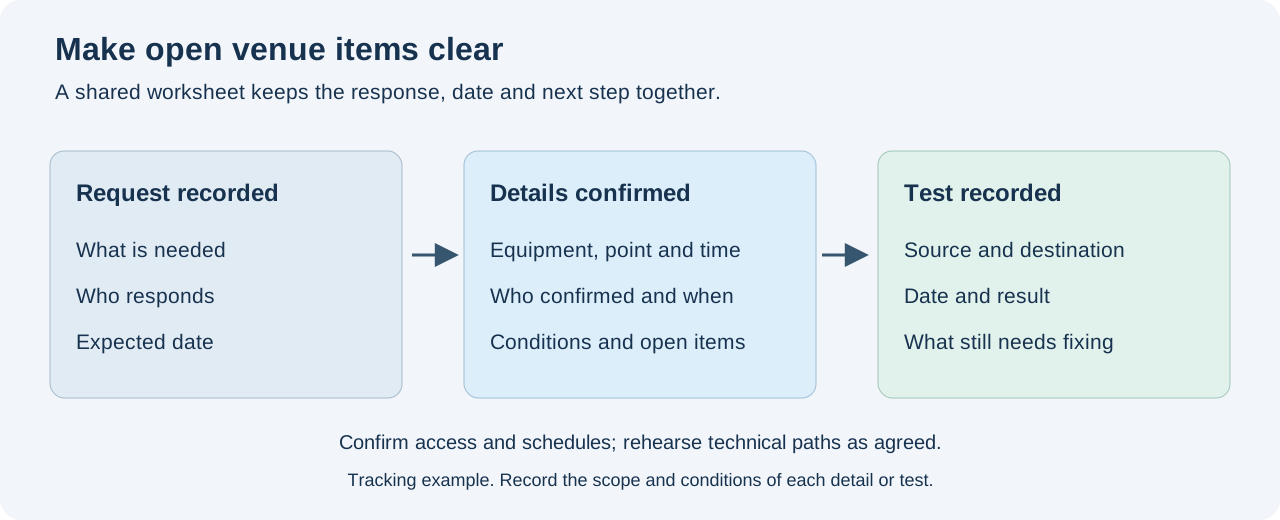
Bring in the people who can confirm and resolve each item
In addition to your sales contact, ask for a venue representative who knows the AV system, an IT contact if you need network access, and the person who confirms load-in arrangements. Record who can authorize changes and who will be available during setup and the show.
Share a version of the schedule and floor plan before the meeting. Mark activities that change how the room is used: audience entry, presentations, panels, video clips, remote guests or entertainment. When the schedule changes, explain what has changed and review the affected items with their owners.
Separate included services, available resources and unconfirmed items
For each resource, ask what is included, who provides it, who operates it and when it can be used. Request the model and connection details of any venue equipment you plan to use. A photo helps identify it; availability for your event still needs confirmation.
If an outside provider is involved, agree with the venue on the applicable access, operating and coordination conditions. Record any additional charges or tasks you are told about and who approves them. This allows you to review the scope before finalizing the order.
| Event request | What to confirm | Who confirms it | Test or decision still needed |
|---|---|---|---|
| Presentation on the room screen | Equipment, input point, format and access to controls | Venue AV technician and video operator | Show the file through the agreed signal path |
| Speech and clips through the room sound system | Connection point, level, channels and system zones | Venue sound technician and event operator | Listen to the sources in the intended coverage areas |
| Remote participant | Connection, service access, accounts and rehearsal date | IT, organizer and call operator | Hear, see and share content in both directions |
| Setup and removal | Access, route, times and any required escort | Venue operations and production team | Route and times confirmed in the worksheet |
Walk the load-in route for the equipment you are bringing
Send the venue the dimensions and weights of the planned cases and ask them to confirm the loading route. Review the dock, doors, elevators, corridors and waiting area where applicable. Agree on who receives the equipment and what changes if several providers arrive at once.
Record when the room becomes available and the deadlines for setup, rehearsal and removal. Allow for access time and tasks that depend on someone else. If furniture or staging must be moved, confirm who will do it and when it will be ready for the next task.
Request power and installation details for your actual setup
The equipment provider must supply the power requirements of the planned equipment; the designated power provider for the event must confirm where and how these needs can be met. Record the outlet, circuit or available identifier, the schedule and who makes the connection. Ask for clarification if the answer is not specific enough to prepare the setup.
Also submit the locations and requirements for stage decks, supports, screens, lighting and cable routes. If the design involves attachments, loads or work at height, request the conditions and technical approvals applicable to that venue and setup. Use the staging and lighting guides to prepare the request with your team.
Agree on who controls the room lights and curtains, and the conditions under which the presentation will be tested. Ask whether other activities or service work will overlap with the session. Record the contact who can handle these changes during the show.
Test the video input you will use during the show
Identify the computer, handoff point and every device along the path to the screen. Ask the technician to confirm formats and access to the installed system's controls. Use sample event files and check the result from the audience area.
If the equipment provides input status information, save the readings together with the source used. The projector guide gives an example for a specific model. To prepare the files, review presentations for LED screens and adapt the test to the screen your room will actually use.
Check the sound through the agreed connection
Agree on what each party sends and receives: speech, clips, music, call return or a recording mix. Confirm the connector, level and channels with both technicians. Test speech and a clip through that path and listen from the areas the venue system will cover.
Check the mix number and the physical connection separately. The Yamaha QL patching guide describes a check for that system. Record the ports and owners for your event and expand the diagram using the hybrid panel guide if people will join remotely.
Coordinate with IT and test the event application
Request the connection point, access method, availability window and IT contact. Explain which application and equipment you will use and what you will send or receive. Arrange a test at the same location and on the same connection planned for operation.
If the call will use Teams, consult the service connectivity guide to prepare the review with IT. Test voice, camera and screen sharing with the equipment for the session. For the encoder and outgoing live stream, also complete the checks in event internet connectivity.
Rehearse program transitions with the operators
Run through a speaker entrance, presentation, clip with sound, call and break as required by the schedule. Identify who gives each cue and who checks the result in the room, live stream or recording. Note the time and destination of any discrepancy so you can repeat that part.
Agree on what the audience will see or hear while a problem is resolved, and who decides to use that option. If a path has not been tested, mark it as pending and assign an owner and deadline. Compare any isolated test from another day with the event's equipment, files and configuration.
Finish the meeting with a worksheet the team can use
Download the venue coordination worksheet. Fill in confirmed details and record each open item with an owner, date and required check. Keep the schedule and floor plan versions used for the meeting. Distinguish a request sent, information confirmed and a test completed: record who replied or tested, and under what conditions.
At the end of setup, review changes with the venue technician. Agree on what stays installed, who removes each item and how the room will be handed back. Share the latest worksheet with the people responsible; any instructions that change the show must also reach the operators.
The worksheet is a blank template: downloading or completing it does not send an inquiry or confirm a booking. You can ask with details still undecided and without knowing the equipment models.
Frequently asked questions
How do I know whether the hotel's AV system suits my event?
Request the equipment available for your date, what is included, who operates it and where each signal connects. Compare this with the event schedule and test the agreed paths with the venue technician.
Who should attend the venue technical meeting?
The organizer, production team and people who can confirm AV, access and network arrangements as applicable. Record who authorizes changes and who will be available during setup and the show.
Can we use part of the hotel's system and bring the rest?
Coordinate that combination with the venue. Identify what each party provides, where it connects and who operates it; rehearse the full path with the technicians involved.
Is a photo of the connector enough to prepare the connection?
The photo helps identify the connector. You also need to identify the equipment, the purpose of that point and the signal details. Ask the venue technician to confirm the path and test it with the event source.
When should we test internet access in the room?
Arrange a test before the show at the planned location and connection. Use the event's application, account and equipment, and record outstanding items with IT.
What if the room is not available until the event day?
Work with the venue to sequence access, setup and rehearsal. Identify which tasks must wait for the room and record the times confirmed by each owner. Use that sequence to check whether there is time to test the show paths.
How do we record something the venue has not yet confirmed?
Mark it as pending, with an owner, expected date and the information or test needed to close it. When the answer arrives, update the worksheet and notify the affected team.
What should we send GLMedia to coordinate with the hotel?
Send the schedule, floor plan, date, times, audience details and destinations for video and sound. Include venue system information, technical contacts and the worksheet of open items so we can review the scope.